Jack

2026

Improving drop-off rates for application submissions through intentional information placement

At Jack, I worked as the sole Product Designer to understand and improve the drastic drop-off rate for application submissions. I saw this project through the entire lifecycle, including user research, design, and development, ending with three shipped designs that improved the retention rate by 16% within one month.

Role

Product Designer

Team

1 Product Designer

1 Product Manager

2 Developers

Timeline

April โ€“ June 2026

Tool

Figma

Figma Make

Cursor

Context

Jack applies to jobs for you

Jack is an AI-enhanced job application platform that matches you with the best job fits. From there, you can use Jack's AI tools to write custom resumes and cover letters for each job, leverage Jack's auto-apply feature, and track your interview rounds.

Problem

High drop off rates after submitting one application
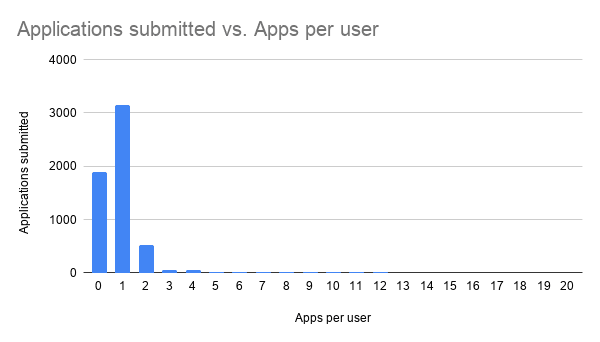
After reviewing retention data, we saw that 86% of users dropped off after submitting a single application. The founder came to me with this problem and wanted to figure out where Jack was losing people.

How might we improve the retention rates from external sites and get people to submit more than one application on Jack?

Solution

Adding improvements at every step

To address this issue, I designed 3 improved screens that would be placed throughout the external application flow, directly targeting themes found in the user research.

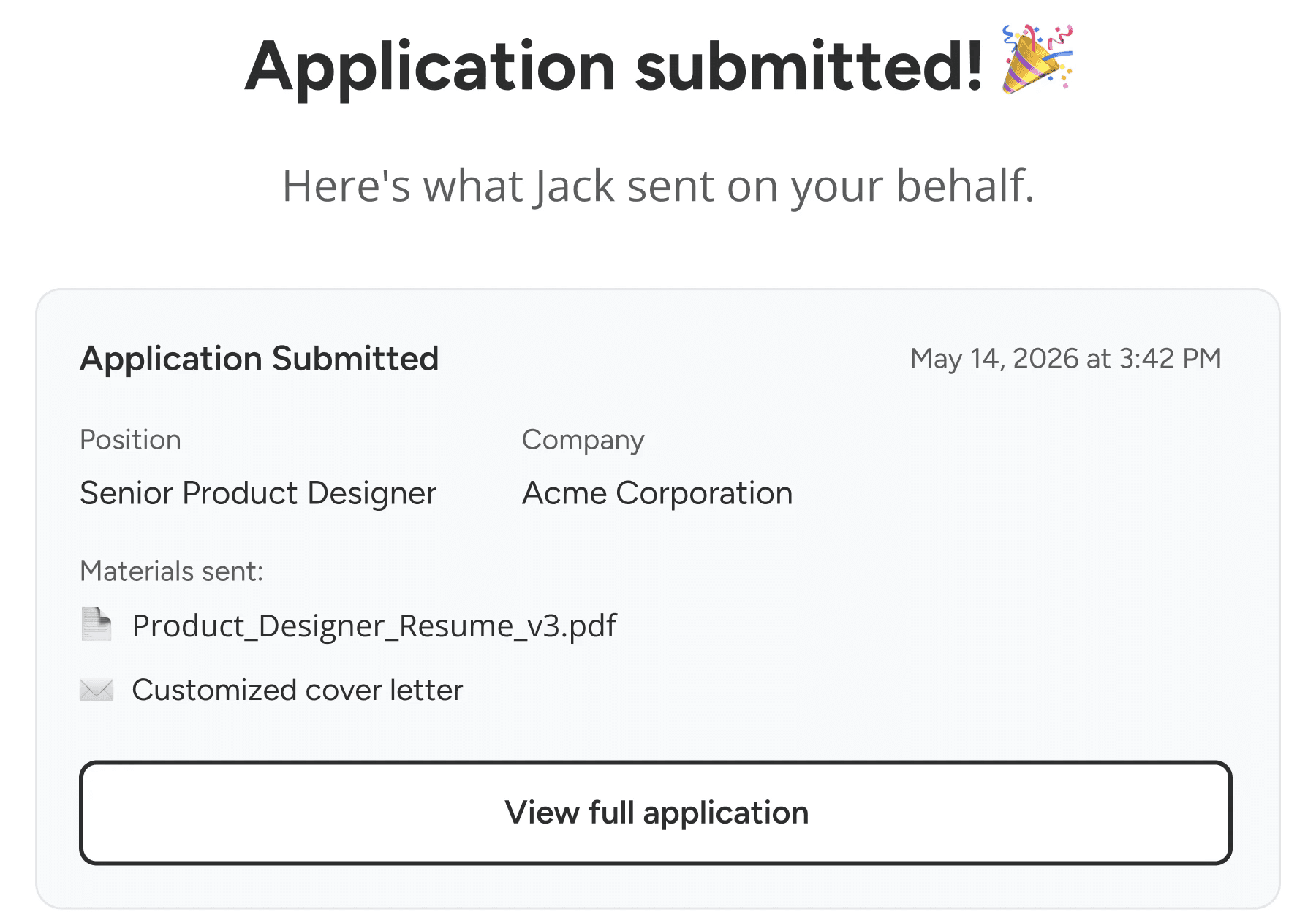
To build users understanding of what Jack was in a digestible form, I created small but effective infographics to introduce what Jack does and what tools are there for the user to leverage. Secondly, an application confirmation email allows users to see documentation of an application and easily find their way back to the platform.

New users who submitted 2+ applications

14%

Before improvements

30%

After improvements

๐Ÿ‘‡ Scroll for the process!

Research

Talking to users who dropped off after one application

Research

Understanding the barriers to code and effective CS teaching methods

User Interviews

Participants: 10 returning users

Medium: 30 min video call

To understand why this was happening, I conducted user interviews with Jack frequenters to understand their experience with job search platforms and then zoomed into Jack's website and conducted a think-aloud of the application flow.

After completing the interviews, I then coded the transcripts, grouped the quotes, and extracted the main insights.

This research allowed us to pull out 3 common themes:

๐Ÿคท๐Ÿปโ€โ™€๏ธ

Unclear mission

Users coming from external application sites have insufficient explanations of Jack's mission, causing users to build false assumptions, leading to confusion or a feeling of deception later on.

๐Ÿ–ฅ๏ธ

Mistrust in AI tools

The AI tools currently on Jack don't allow for iterations or proofreading before submission, leading to users feeling skeptical.

๐Ÿš™

No way back

Jack has an in-platform mailbox that gets submission confirmations, but it doesn't send them to users' personal inboxes. This leads to users losing their way back to Jack.

Design Process

Ideating solutions

To address these research themes, we leaned towards these statements to guide us:

  1. How might we make Jack's role in the application process feel transparent rather than discovered?

  1. How might we help users understand and trust what Jack sent on their behalf?

Development

Using Cursor to speed up development

Being a small team of 1 designer and 2 devs, our team prioritized AI tools to ship features as efficiently as possible

Our workflow consisted of:

  1. Designer creates the Figma design, iterates, and finalizes the designs

  2. Designer creates a detailed ticket in Linear that includes design specs (colors, dimensions, placement) and necessary images/icons

  3. Assign a Cursor agent to the ticket to code the design as a branch in GitHub

  4. Dev team is assigned the ticket to refine the code and ship the feature

Final Solution

Final design: Creating a more informed application experience

We wanted to prioritize quick wins for this round of designs to ship improvements fast and continue to create more complex, long-term solutions in the coming months.

๐Ÿ‘‰ Check out the Jack website here

๐Ÿ‘‰ Check out the Jack website here

View the full case study on a desktop!

  1. Job description page

Improvement

I created a "Here's how to apply" infographic at the bottom of the job description to ease people into the application process while slowly introducing Jack's features like the AI resume customization tool.

Why I did this

Because users are used to job application platforms following the same format, they have no mental model for what Jack offers. This information serves as a scannable way for people to start building their understanding of Jack without doing an elaborate onboarding.

  1. Application pages

Improvement

In the application flow, I created a "Here's what Jack will use to make it" infographic at the bottom of the custom resume page.

Why I did this

Transparency in AI was a big theme in the conversations I had with users. This infographic serves as a way to show exactly what is being fed to the AI to create the custom resume, inviting more transparency into the application process. Although this doesn't give the user full control, it is a good way to increase understanding while we take the time to create a more in-depth way to give users autonomy with Jack's AI tools.

  1. Follow-up email

Improvement

This entire email was newly created and gets triggered every time an application is submitted on Jack, with details on the submission as well as links back to the platform and additional job postings.

Why I did this

Jack's in-platform inbox was getting overlooked by many users, leaving them unsure whether applications had been submitted, or unable to remember how to get back to the Jack site. Creating an email that goes straight to the user's personal inbox is a familiar, standard practice across job platforms, and an easy way to bring people back to the platform and increase their trust in Jack's abilities.

Next steps & Takeaways

Next steps for Jack

This round of design solutions focused on quick but effective ways to improve the applying experience. The research, however, uncovered many layered problems that will take more time and thoughtfulness to solve.

Increasing autonomy in AI tools

One problem I'm actively working on is finding ways to give users more control over their voice in the AI resume and cover letter generator, without sacrificing Jack's ability to deliver applications quickly and at scale. One way I'm tackling this is by allowing users to train the AI used for each section of their application.

Lessons I learned

Working in such a small startup environment allowed me to get to know the design process across its entire lifecycle intimately, and fostered a fast-paced environment to ship and learn constantly.

Two key lessons that stood out:

โš–๏ธ Prioritizing quick wins vs. complex solutions. Jack gains new users every day, so waiting too long to act carries real risk. Sometimes the right move isn't the ideal solution, it's a quick win that buys breathing room to build something more in-depth later, without leaving the problem unaddressed in the meantime.

๐Ÿ‘ฉ๐Ÿปโ€๐Ÿ’ป Leaning into new tools. Integrating an AI coding tool like Cursor was a new experience for me, and at times it felt unnatural. But embracing the new features allowed me to work more seamlessly with the development team, and it was a good lesson in leaning into change to get the most efficient outcome.